Setup a Layered Architecture for Your Project
Setup a Layered Architecture for Your Project
This is the documentation for the backend. For the frontend, see frontend/README.md.
Introduction
This tutorial describes how to setup a layered architecture for your project. Before answering the question HOW to do that, we should ask ourselves the question WHY we would do that! An important principle in general, but definitely also in Software Engineering is the KISS-principle: Keep It Stupid and Simple. Things that are simple are less error prone, easier to verify and can be easily understood by others as well. Making our architecture more complex is therefore only reasonable if it serves a purpose.
Our Goals
What do we want to achieve with a proper project architecture?
Separation of Concerns
Each part (component) of a software has an own and preferably single responsibility. Benefits: that component can be more easily re-used for that single responsibility and that part can be developed by an expert (e.g. user interface developers are different from so called back-end developers). Finally, the components can be developed independent from each other, as long as the way they should communicate with each other is clearly defined.
Testable Code
Tests and test-driven development make sure that what is developed is based on the defined requirements, and not more than that. The other way around, tests give a certain level of confidence that the implementation does what it should do. When software components use other services (Dependent-On-Components, DOC), we typically don’t want to test the whole chain at once. We want to test that component (the System Under Test, SUT) in isolation. From test- perspective, we have to be able to replace the DOC’s by something that the tester has completely in control. We want to test the component itself and its interaction with the DOC’s, not the DOC’s themselves.
Re-usable Code
One of the idea’s of Object Oriented software development is the development of re-usable components. If you have well-tested re-usable components available, why reinvent the wheel? Furthermore, re-usable code avoids duplication of code. You might know the DRY design principle Don’t Repeat Yourself. From the databases course, you must have learned that redundancy might lead to inconsistencies.
Maintainable Code
All the above mentioned goals have to do with software quality. Maintainable code is readable, testable, re-usable and also very important easily extendible. Software changes are risks; how can we minimize these risks? Because one thing is sure, software systems will change over time. But also here some relativity: don’t use a sledgehammer to crack a nut. Maintainability becomes more important when software becomes bigger, more people are involved, the expected live-time is longer, and the number of expected changes and / or extensions becomes bigger.
Our Design Starting Points
A Layered Architecture
A layered architecture that addresses the concerns:
- RestAPI Layer - Presenting information and interact with external systems (such as a web page)
- Business Logic API Layer - Interface to the Business Logic Layer
- Business Logic Layer - Modeling the real world, the business and its business rules
- Persistence API Layer - Interface to the Persistence Layer
- Persistence Layer - For Storing data
- Assembler Layer - To wire up the layers and to provide the entry point of the application
Program Against Interfaces
It’s often not necessary to know the implementation to be able to use it. Think about you driving a car. That’s perfectly possible without knowing how it works, but by only knowing its interface (steering wheel, pedals, gear) and how to use that. Benefit is that you can drive other car implementations with that same interface without any problem. The implementation is interchangeable.
Use Factory Classes
To create objects (instances) of a type (so always when using the new keyword), we need to know the
actual concrete type (the implementation). That causes dependency. Try to do the creation of objects in
separate classes, called factory classes.
Design principles are mostly focussed on avoiding dependency. But isn’t that very logical? In real life, we also want to avoid dependency. Dependency causes complexity, independency gives freedom! When you have a job, you’re married, have children, you have dependencies and responsibilities that restrict freedom. Why did UK think that leaving the EU was a good idea? Too much dependency can even cause that rules are set FOR you! Independency is therefore persuable. But is avoiding dependency always a good idea? It comes with a price (its own complexities) as well. Moral of the story? We have to find a balance between making things flexible but still simple.
Let’s Set It Up
TIP: With the demo application in this repository, you have received a (hopefully) working starting point for your project. HOWEVER… it is important is that you are able to setup a project yourself as well. Therefore, the tutorial below describes the way to do it. We highly recommend that each group tries to setup a working project architecture themselves. Afterwards, you can start together from scratch again, having gained relevant knowledge. The paragraphs below don’t contain all the details; these can be looked up in the example implementation however. Okay, here we go…
What’s key? Our Business Logic of course! The persistence layer is only a service that serves the Business Logic Layer by storing object data at any time, and retrieving these on request. From a business point of view not important. The (G)UI or RESTAPI only enables end users to interact with the business logic. From that perspective it’s only a passthrough and a messenger; relevant from a software system point of view, not from a business point of view. Assume that we want to write an application that is able to create, store and retrieve customers. We’ll explain the setup step-by-step afterwards.
Step 1: Create a Maven Project
Create a Maven project, either:
- In your IDE (e.g., NetBeans, choose ‘Java with Maven’ and ‘POM project’ as project type)
- Via the command line using
mvn archetype:generate- see Maven in Five Minutes
This Project will be your overall application, let’s call it AirlineInformationSystem (AIS). This AIS will be the parent of all your sub projects that we’ll create on the fly. A Maven project can be recognized by its pom.xml (POM = Project Object Model). This file contains all the settings of your project.
Within this project you can create so-called modules, which are Maven Modules. This comes with some benefits:
- All sub projects (Maven modules) will have this project as parent and inherit general settings
- Your complete software including all its modules can now be built with one single Maven command
- All your sub projects will be created in sub directories of this AIS-project
Open the POM file of your AIS-project and set the informaticspom as its parent-pom:
<?xml version="1.0" encoding="UTF-8" standalone="no"?>
<project xmlns="http://maven.apache.org/POM/4.0.0" xmlns:xsi="http://www.w3.org/2001/XMLSchema-instance" xsi:schemaLocation="http://maven.apache.org/POM/4.0.0 http://maven.apache.org/xsd/maven-4.0.0.xsd">
    <modelVersion>4.0.0</modelVersion>
    <parent>
        <groupId>io.github.fontysvenlo</groupId>
        <artifactId>informaticspom</artifactId>
        <version>1.5</version>
        <relativePath/>
    </parent>
    <groupId>nl.fontys.ais</groupId>
    <artifactId>airlineinformationsystem</artifactId>
    <version>1.0-SNAPSHOT</version>
    <packaging>pom</packaging>
    <name>AirlineInformationSystem</name>
    <properties>
        <project.build.sourceEncoding>UTF-8</project.build.sourceEncoding>
    </properties>
</project>
TIP: This structure is sometimes also referred to as a monorepo (Wikipedia). It has the advantage that all projects can be managed and versioned together in one repository, while still being able to build and test them separately.
Step 2: Create the Business Logic Module
Business is key! Create a business logic module within the AIS-project.
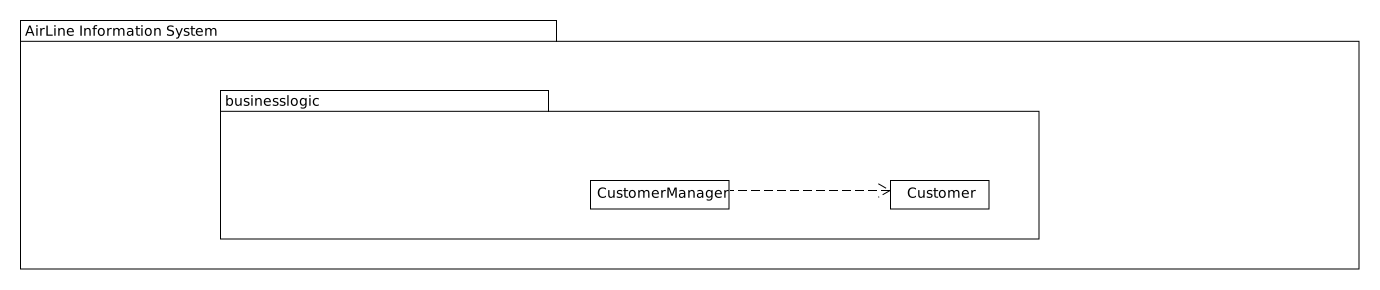
In NetBeans, right-click the Modules folder and select ‘Create new Module’ and choose ‘Java Application’ as project type. This project acts as business logic layer. What do we need in this layer?
- Test classes - Of course your business logic should be tested and you’ll use a test-first approach
- A Customer class - To represent a real world Customer (assuming this is part of your domain)
- A CustomerManager class - To create/manage Customer objects and store them (e.g., in a List)
Step 3: Create the RestAPI Module
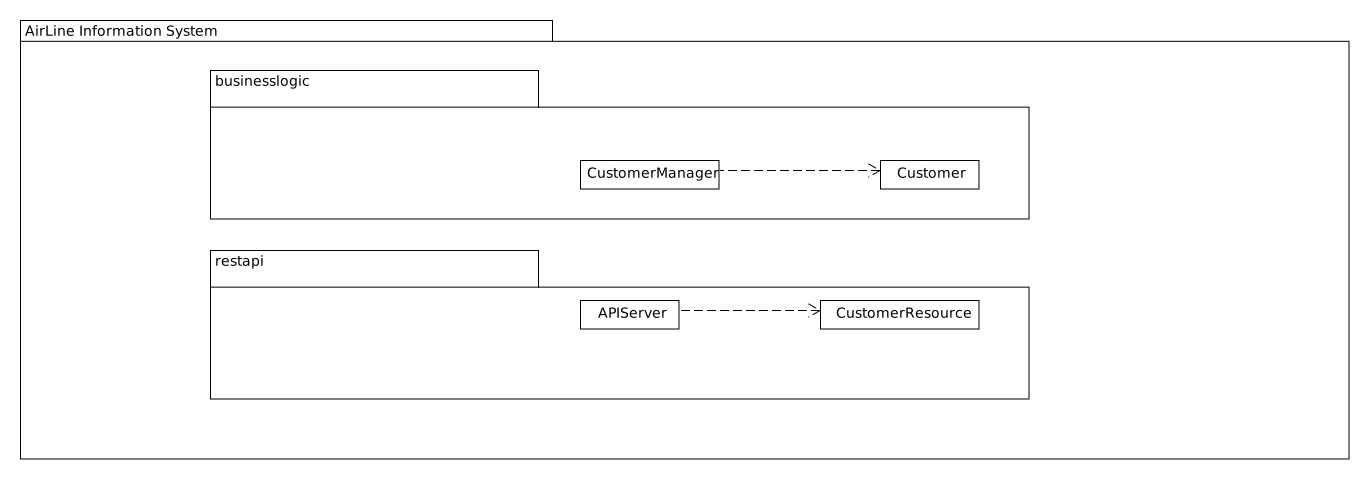
Time to interact! Create the RestAPI module. For the RestAPI, we use the Javalin framework. This module will act as RestAPI Layer.
TIP: Whenever using a framework, make sure to check the documentation. The Javalin documentation can be found at javalin.io/documentation. Also consider the version of the framework you are using.
Create a new module in your AIS-project, and add a dependency to the Javalin framework:
<dependencies>
    <dependency>
        <groupId>io.javalin</groupId>
        <artifactId>javalin-bundle</artifactId>
        <version>6.4.0</version>
    </dependency>
</dependencies>
Step 4: Define the BusinessLogic API
Time to wire up things. How could we enable the RestAPI layer to communicate with the BusinessLogic layer?
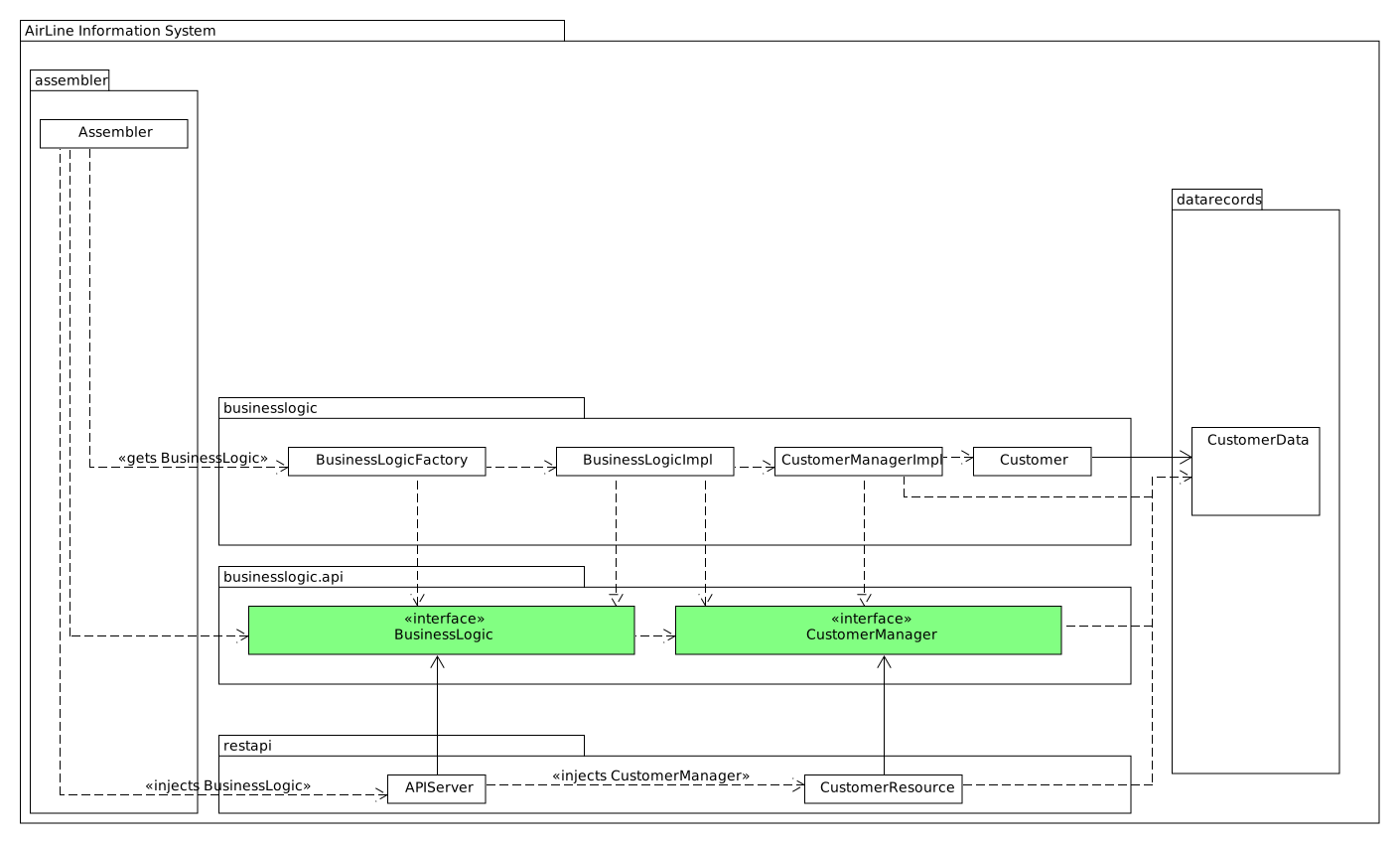
The business layer, the core of your application, should be unaware of the presentation layer (a RestAPI, a GUI). Normally, the RestAPI will trigger the interaction with the BusinessLogic. Therefore it should at least know how to talk to it, so knowing its interface. The BusinessLogic does not need to know anything about the RestAPI!
So, the RestAPI uses the BusinessLogic, making it a Dependent-On-Component (DOC). We want both to be testable independently. We can do this by injecting the BusinessLogic into the RestAPI. The RestAPI should only know the interface of the BusinessLogic, not the actual implementation.
Create a new module called businesslogic-api. This module will only contain interfaces! Add dependencies:
<dependencies>
    <dependency>
        <groupId>nl.fontys.ais</groupId>
        <artifactId>businesslogic-api</artifactId>
        <version>1.0-SNAPSHOT</version>
    </dependency>
</dependencies>
Also add this dependency to the BusinessLogic module, since the implementation should know which interfaces to implement.
Step 5: Setup a DataRecords Module
The demo-implementation uses a data records approach. Each entity class (Customer for example) encapsulates a data record field (of type CustomerData) and business logic. Data records are Java record types - immutable data carrier objects available in all layers.
Create a new module ‘DataRecords’ of type ‘Java Application’. Let the BusinessLogic-layer, the BusinessLogic-API-layer and the RestAPI-layer depend on this new module.
Step 6: The Assembler Module
We need something that acts as the starting point of our application - a ‘main’ method. Let’s call this our ‘Assembler’. The Assembler wires up the REST API with the BusinessLogic implementation via the BusinessLogic API.
Create an Assembler module and add dependencies to: BusinessLogic, BusinessLogic-API, and RestAPI.
The Assembler’s responsibility is to setup layers and connect them. In the BusinessLogic layer, create a BusinessLogicFactory class with a static method getInstance() that returns an implementation of the BusinessLogic API. The Assembler then creates a Javalin server app and passes the BusinessLogic API object as parameter (dependency injection).
Step 7: Give REST Resources Access to Business Logic
Our REST APIServer is responsible for setting up the server and handling HTTP requests. Create a CustomerResource class responsible for handling customer-related requests. It has a constructor that takes a CustomerManager object as parameter.
NOTE: For convenience, we implemented our
CustomerResourceusing theCrudHandler- Javalin Handler Groups - provided by Javalin.
Step 8: Setup the Persistence Layer
We currently have a working application with an in-memory database. What we need is a persistence layer that stores and retrieves data long-term. Different storage types could be chosen: relational database, XML, JSON files, etc.
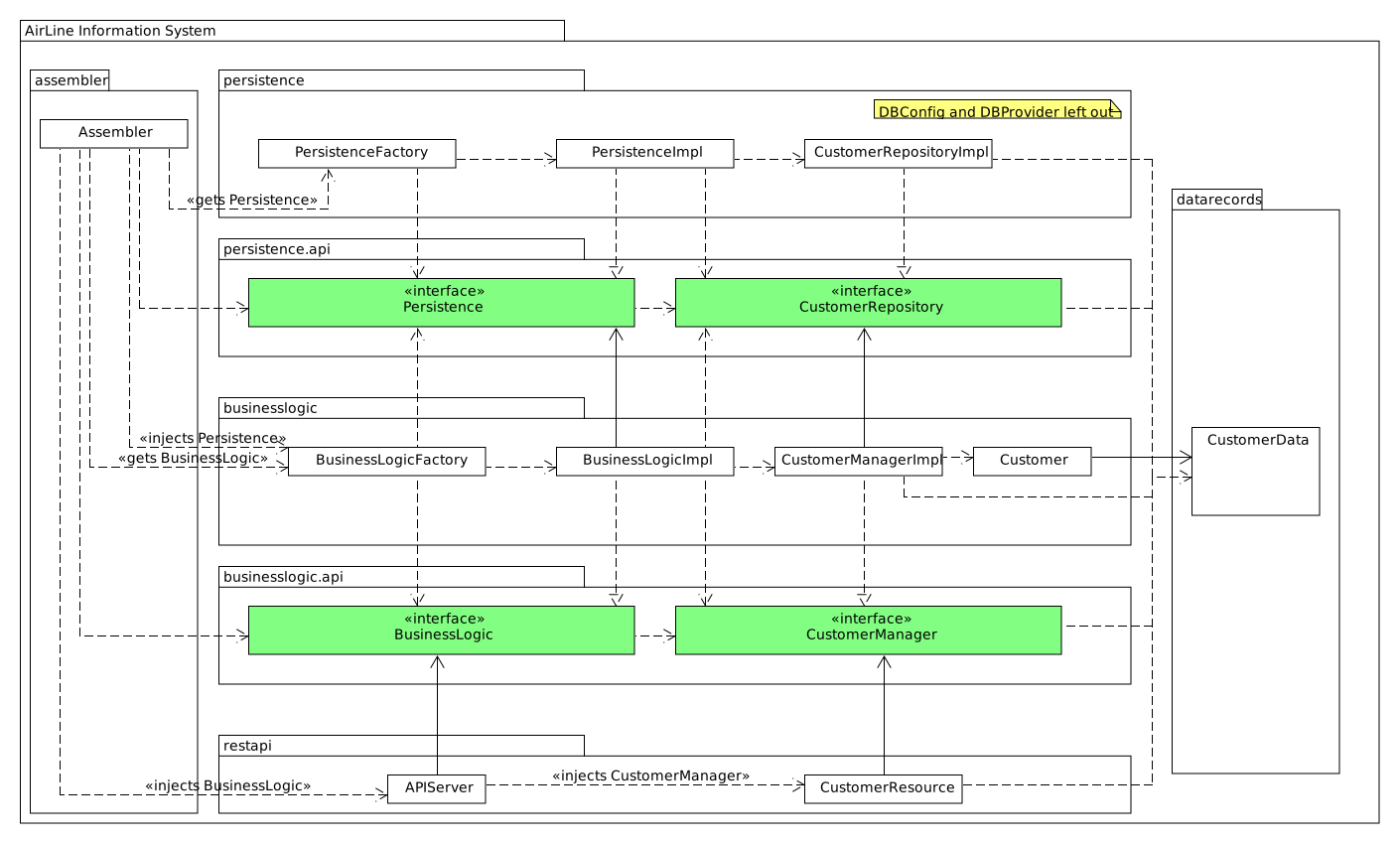
The BusinessLogic uses the persistence layer as a service - another DOC! It shouldn’t create this service itself. The BusinessLogic should only talk to the Persistence interface (Persistence API) and get an actual implementation injected.
- Create a new module
persistence-apiwith the Persistence API interface and CustomerRepository interface - Create another module
persistencewith the actual persistence implementations and a PersistenceFactory - Make sure BusinessLogic and Persistence depend on the Persistence-API
Important: Since we have a persistence layer now, remove the in-memory database (cache) from
CustomerManagerImplto avoid sync issues.
Configuration: DBConfig and ServerConfig
The persistence layer needs to know how to connect to the database. Create a DBConfig record that provides connection information. Similarly, the RestAPI can be configured with a ServerConfig record.
A common way to store configurations is using a .properties file. The Assembler reads this file and passes it in a structured way to the layers.
Some Remarks
-
This architectural setup acts as a starting point, addressing issues you’ll encounter when setting up an architecture. The example is not completely optimized - services could be made more generic.
-
The Factory interfaces could be provided with additional parameters to influence which implementation is returned.
- The persistence layer could be more generic. Otherwise, you’ll have duplicated code in Repository classes. Consider:
- Moving code to a shared abstract super class
- Using Generic Types
- Using reflection to automatically get object fields, types, and values
- Goal: less, readable, and testable code
- Allow yourself to optimize step-by-step. Martin Fowler on refactoring
- Example tests in the demo project:
- Assembler layer - Integration test using real database (Testcontainers) and HTTP requests (RestAssured)
- Persistence layer - Unit tests (Mockito for JDBC) and integration tests (Testcontainers)
- REST API layer - Tests in isolation, mocking the BusinessLogic layer
- DataRecords - No tests needed (no behavior)
- Business Layer - Add your own tests!
-
Continuous deployment: See your dashboards. The
/healthendpoint reports application status - do not change or remove this endpoint or the availability of your application will be affected! - GitHub Actions: The
.github/workflows/verify.ymlfile runs tests on every push. See GitHub Actions docs.
Database Schema (db/init.sql)
The db/init.sql file serves as the single source of truth for your database schema. It contains:
- Schema creation (
CREATE SCHEMA ais) - Table definitions (e.g.,
customers) - Sample data for development and testing
This file is used in two places:
- Tests - Testcontainers loads it via
.withInitScript("init.sql") - Deployment - The same script initializes the production database
By keeping schema definitions in version control alongside your code, you ensure that database changes are tracked, reviewed, and deployed consistently. When you add new entities (e.g., flights, bookings), extend this file with the corresponding CREATE TABLE statements.